-

Software Development
A perfect combination of innovation, flexibility and adaptability and ease makes our software the ideal solution for any type of business (small or large sized).
Our objective is to provide the most excellent and brilliant software solutions to our customers. Read More -

Web Development
The Internet is an active and ever changing environment and we create plans that fit within your needs and budget.
We offer full support to your web design to make it informative and attractive. Read More -

Mobile Apps
We offer complete package provides our valuable customers with mobile applications that utilize the full extent of mobile applications programming for Android, BlackBerry, iPhone, Windows Mobile, Kindle, and Symbian, amongst others. Read More
- 1
- 2
- 3
Asus Transformer Book T100 Review
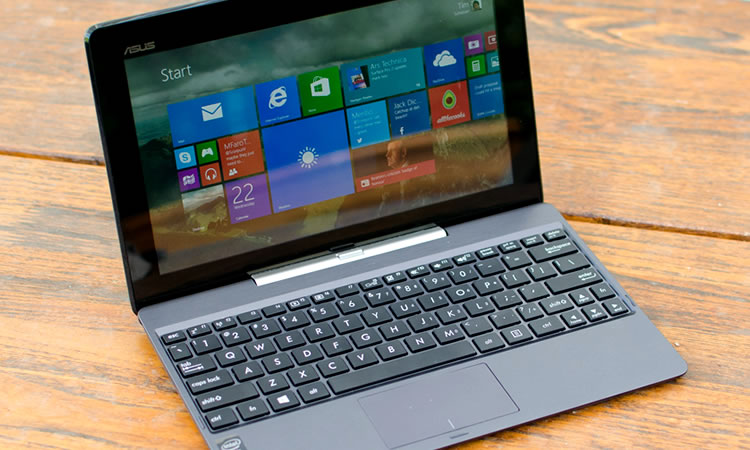 Design
Asus’ typical tablet design is once again harnessed for the Transformer Book T100. To be honest, there’s not a great deal of things a company can do to shake up the standard 10-inch tablet form, but at least Asus has managed to work in a few signature touches. The circular radial pattern on the back has returned, with prominent Asus branding, giving the device a great shine in the light.
However the pattern doesn’t provide any texture, with Asus opting for a glossy, smooth plastic coating over the deep-grey back. Other Asus tablets tend to use matte plastic that preserves the gentle ribbed feel caused by the radial pattern, which gives the tablet a nicer texture, but instead the T100 is smooth all over. That includes the glass protecting the touchscreen, which is coated to assist fingers swiping across the display.
Despite a mostly plastic construction, the T100 feels remarkably solid. There is a small amount of flex in the back panel when a large amount of force is applied, which is a by-product of using plastic rather than metal. It definitely doesn’t feel like the tablet is going to snap in half, and a small rim around the screen should help slightly to protect the glass in the case of a drop. Naturally, both the front and back of this glossy device are huge fingerprint magnets, but they seem quite scratch-proof.
The front of the tablet is buttonless, ditching any sort of Windows button for a minimalist profile. Above the 10-inch display you’ll find some branding to the left, plus an off-center front facing camera, and an ambient light sensor. Here we’re dealing with your standard slate-style tablet; perhaps a tad wide due to the 16:9 display aspect ratio, but there’s enough bezel to hold the device comfortably.
The left edge sees both a volume rocker and the relocated Windows button, the latter of which definitely feels like a mandatory Microsoft-forced inclusion (it is) rather than a thought-out, ergonomic placement. Along the top you’ll find the power button to the left, while the right hand side has all the ports. The T100 gives you a micro-USB port, micro-HDMI port, exposed microSD card slot and 3.5mm audio jack.
Brightness is average, if tending towards the low side when considering the reflective glossy protective coating. The tablet does include a photodetector to automatically adjust the brightness depending on the conditions, and it generally works quite well, but it can be difficult to read text on the display when outdoors in the sun.
The resolution is obviously the most disappointing aspect of the Transformer Book T100’s display with its 155 PPI. 768p has remained the ‘default’ resolution of sorts for generations of Windows laptops, however the market is shifting away from this relatively low resolution in favor of 1080p and higher. One great example of this is Microsoft’s Surface, which ditched 768p in the Surface RT for 1080p in the Surface 2.
Source: http://www.techspot.com/